
Performance
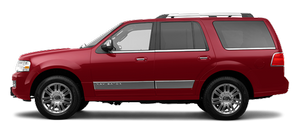
A big SUV is all about imposing looks and a muscular engine. The Navigator has the looks part down, but the 300-horsepower V-8 engine seems woefully lacking in the power department, especially at takeoff. There was zero excitement about pressing the gas pedal, and leaving a stoplight never elicited joy of any kind.
Steering, on the other hand, was surprisingly accurate and relatively light for an SUV. When driving a large vehicle it's often hard to tell how wheel input will translate to the road, but not in the Navigator.
Unfortunately, the brakes didn't offer the same great feedback and were unreliable in bad weather; I made sure to give myself extra room in highway and city driving. Even the best of brakes would have a tough time slowing down so much weight, and Lincoln should consider upgrading these stoppers, even though they're already of the four-wheel-disc antilock variety.
The ride was pleasant on most surfaces, but nothing spectacular; wind noise was also pronounced, as you would expect. The comfortable seats and soft suspension were both welcome on long rides.
Mileage is rated at 13/18 mpg (city/highway), and the trip computer stated I was averaging 14 mpg with a lot of highway miles. After a full tank fill up, the mileage was just under 13 mpg. That might sound horrible, but considering the class and how often I was trying to test the V-8's throttle response, it's probably a positive for the Navigator.
See also:
Underbody
Flush the complete underside of your vehicle frequently. Keep body and
door drain holes free from packed dirt. ...
Remote entry system
The intelligent access keys (IA key) comply with part 15 of the FCC
rules and with RSS-210 of Industry Canada. Operation is subject to the
following two conditions: (1) This device may not cause h ...
Breaking-in your vehicle
Your vehicle does not need an extensive break-in. Try not to drive
continuously at the same speed for the first 1,000 miles (1,600 km) of
new vehicle operation. Vary your speed frequently in order ...