
Programming
Do not program HomeLink with the vehicle parked in the garage.
Note: Your vehicle may require the ignition switch to be turned to the accessory position for programming and/or operation of the HomeLink .
It is also recommended that a new battery be placed in the hand-held transmitter of the device being programmed to HomeLink for quicker training and accurate transmission of the radio-frequency signal.
1. Position the end of your hand-held transmitter 1–3 inches (2–8 cm) away from the HomeLink button you wish to program (located on your visor) while keeping the indicator light in view.
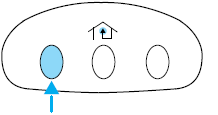
2. Simultaneously press and hold both the chosen HomeLink and hand-held transmitter buttons until the HomeLink indicator light changes from a slow to a rapidly blinking light. Now you may release both the HomeLink and hand-held transmitter buttons.
Note: Some entry gates and garage door openers may require you to replace Step 2 with procedures noted in the Gate Operator and Canadian Programming in this section for Canadian residents.
3. Firmly press and hold for five seconds and release the programmed HomeLink button up to two separate times to activate the door. If the door does not activate, press and hold the just-trained HomeLink button and observe the indicator light.
• If the indicator light stays on constantly, programming is complete
and your device should activate when the HomeLink button is pressed
and released.
• If the indicator light blinks rapidly for two seconds and then turns
to a constant light continue with “Programming” Steps 4 through
6 to complete programming of a rolling code equipped device (most
commonly a garage door opener).
4. At the garage door opener receiver (motor-head unit) in the garage,
locate the “learn” or “smart” button (usually near where the hanging
antenna wire is attached to the unit).
5. Firmly press and release the “learn” or “smart” button. (The name and
color of the button may vary by manufacturer.)
Note: There are 30 seconds in which to initiate Step 6.
6. Return to the vehicle and firmly press, hold for two seconds and release the programmed HomeLink button. Repeat the press/hold/release sequence again and, depending on the brand of the garage door opener (or other rolling code equipped device), repeat this sequence a third time to complete the programming.
HomeLink should now activate your rolling code equipped device. To program additional HomeLink buttons begin with Step 1 in this section.
See also:
How does the side air-curtain system work?
The design and development of the
side air curtain system included
recommended testing procedures
that were developed by a group of
automotive safety experts known as
the Side Airbag Techn ...
Brake fluid
The fluid level will drop slowly as
the brakes wear, and will rise when
the brake components are replaced.
Fluid levels between the MIN and
MAX lines are within the normal
operating range; ...
Replacing exterior bulbs
Check the operation of all the bulbs frequently.
Replacing headlamp bulbs
Check the operation of all bulbs frequently.
1. Make sure that the headlamp control is in the off position.
2. Open the ...