
Operating the HomeLink Wireless Control System
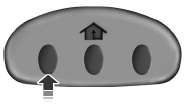
To operate, simply press and release the appropriate HomeLink button.
Activation will now occur for the trained product (garage door, gate operator, security system, entry door lock, or home or office lighting etc.). For convenience, the hand-held transmitter of the device may also be used at any time. In the event that there are still programming difficulties, contact HomeLink at www.homelink.com or 1–800–355–3515.
See also:
Emergency towing
In case of a roadside emergency with a disabled vehicle (without access
to wheel dollies, car hauling trailer, or flatbed transport vehicle) your
vehicle (regardless of transmission powertrain con ...
Lane keeping system
The newly available Lane Keeping System adds to the advanced capabilities
already offered on MKT, including collision warning and BLIS® (Blind Spot
Information System) with cross-traffic alert.
La ...
Calculating fuel economy
1. Fill the fuel tank completely and record the initial odometer reading
(in miles or kilometers).
2. Each time you fill the tank, record the amount of fuel added (in
gallons or liters).
3. Af ...