
Power windows

WARNING: Do not leave children unattended in the vehicle and do not let children play with the power windows. They may seriously injure themselves.
WARNING: When closing the power windows, you should verify they are free of obstructions and ensure that children and/or pets are not in the proximity of the window openings.
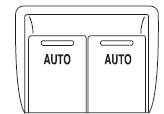
Press and pull the window switches to open and close windows.
• Press down (to the first detent) and hold the switch to open.
• Pull up (to the first detent) and hold the switch to close.
Rear Window Buffeting: When one or both of the rear windows are open, the vehicle may demonstrate a wind throb or buffeting noise. This noise can be alleviated by lowering a front window approximately 2–3 inches (5–8 cm).
See also:
Adjusting the second row seatback
WARNING: Reclining the
seatback can cause an
occupant to slide under the seat’s
safety belt, resulting in severe
personal injuries in the event of a
collision.
The second row seat recline ...
The importance of shoulder belts
Using a booster without a shoulder belt increases the risk of a child’s
head hitting a hard surface in a collision. For this reason, you should
never use a booster seat with a lap belt only. It is ...
Additional assistance
If you have questions or concerns, or are unsatisfied with the service you
are receiving, follow these steps:
1. Contact your Sales Representative or Service Advisor at your
selling/servicing aut ...