
Using speed control

The speed controls are located on the steering wheel. The following buttons work with speed control:
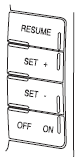
RESUME: Press to resume a set speed.
SET +: Press to increase the set speed.
SET –: Press to decrease the set speed.
OFF/ON: Press to turn speed control off or on.
See also:
Treadwear
The treadwear grade is a comparative rating based on the wear rate of
the tire when tested under controlled conditions on a specified
government test course. For example, a tire graded 150 would w ...
Additional assistance
If you have questions or concerns, or are unsatisfied with the service you are receiving, follow these steps:
1. Contact your Sales Representative or Service Advisor at your selling/servicing autho ...
Replacing exterior bulbs
Check the operation of all the bulbs frequently. ...