
Keyless entry keypad procedure

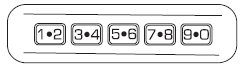
1. Turn the ignition to the off position.
2. Close all the doors.
3. Enter factory–set 5–digit entry code.
4. Press and hold the 3 • 4. While holding the 3 • 4, press and release the 7 • 8. While still holding the 3 • 4, press and release the 7 • 8 a second time.
5. Release the 3 • 4.
The user should receive a horn chirp to indicate the system has been disabled or a chirp followed by a honk to indicate the system has been enabled.
See also:
Driving on snow and ice
Note: Excessive tire slippage can cause transmission damage.
AWD vehicles have advantages over 2WD vehicles in snow and ice but
can skid like any other vehicle.
Should you start to slide while dri ...
Disengaging speed control
Press the brake pedal to disengage the speed control. Disengaging the
speed control will not erase the previous set speed. ...
Setting the clock
CLOCK: Press to set the clock. The display will read SET TIME. Use the
memory preset numbers (0–9) to enter in the desired time– hours and
minutes and press OK. The clock will then begin from that ...