
Programming spare keys

You can program your own integrated keyhead transmitters or standard SecuriLock coded keys to your vehicle. This procedure will program both the engine immobilizer key code and the remote entry transmitter portion of the IKT to your vehicle.
Note: A maximum of eight coded keys can be programmed to your vehicle; only four of these eight can be IKTs with remote entry functionality.
Tips:
• Only use integrated keyhead transmitters (IKTs) or standard SecuriLock keys.
• You must have two previously programmed coded keys (keys that already operate your vehicle’s engine) and the new unprogrammed key(s) readily accessible.
• If two previously programmed coded keys are not available, you must take your vehicle to your authorized dealer to have the spare key(s) programmed.
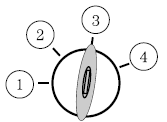
Please read and understand the entire procedure before you begin.
1. Insert the first previously programmed coded key into the ignition.
2. Turn the ignition from the 1 (off) position to the 3 (on) position. Keep the ignition in the 3 (on) position for at least three seconds, but no more than 10 seconds.
3. Turn the ignition to the 1 (off) position and remove the first coded key from the ignition.
4. After three seconds but within 10 seconds of turning the ignition to the 1 (off) position, insert the second previously coded key into the ignition.
5. Turn the ignition from the 1 (off) position to the 3 (on) position. Keep the ignition in the 3 (on) position for at least three seconds, but no more than 10 seconds.
6. Turn the ignition to the 1 (off) position and remove the second previously programmed coded key from the ignition.
7. After three seconds but within 20 seconds of turning the ignition to the 1 (off) position and removing the previously programmed coded key, insert the new unprogrammed key (new key/valet key) into the ignition.
8. Turn the ignition from the 1 (off) position to the 3 (on) position. Keep the ignition in the 3 (on) position for at least six seconds.
9. Remove the newly programmed coded key from the ignition.
If the key has been successfully programmed it will start the vehicle’s engine and will operate the remote entry system (if the new key is an integrated keyhead transmitter). The theft indicator light will illuminate for three seconds and then go out to indicate successful programming.
If the key was not successfully programmed, it will not start your vehicle’s engine and/or will not operate the remote entry features. The theft indicator light may flash on and off. Wait 20 seconds and you may repeat Steps 1 through 8. If failure repeats, bring your vehicle to your authorized dealer to have the new key(s) programmed.
To program additional new unprogrammed key(s), wait 20 seconds and then repeat this procedure from Step 1.
See also:
Safety
Four-wheel-disc antilock brakes, traction control and an electronic stability
system are standard. The MKZ's six standard airbags include side-impact airbags
for the front seats and side curtain a ...
Blocked sensor
If a message regarding a blocked
sensor is displayed, the radar signals
from the sensor, located behind a
fascia cover near the driver side of
the lower grille, have been
obstructed. When th ...
Determining if the system is operational
The SRS uses a readiness light in the instrument cluster or a tone to
indicate the condition of the system. Refer to Warning lights and
chimes in the Instrument Cluster chapter. Routine maintenanc ...