
Driving Impressions
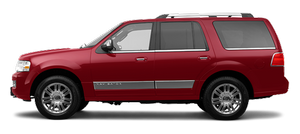
Lincoln has made some significant improvements in the Navigator’s driving experience, just asFord has moved ahead with the 2003 Expedition, which is a close relative to Lincoln’s SUV. The Navigator’s ride is pleasantly satisfying overall, and the suspension responds quickly to bumps without overreacting. This SUV does a fine job of keeping its tires on the pavement.
The 2003 Navigator’s handling is unquestionably more refined than its predecessor’s, but a short run with the previous model demonstrated — on the highway, at least — that it wasn’t a bad vehicle at all. The revised model performs capably on twisting two-lane roads, but it’s still a tad unsure of itself at times. It’s not seriously carlike in personality, which could be a good thing, because making an SUV too carlike might detract from its other virtues.
Although the automatic transmission reacts easily most of the time, multiple downshifts when the gas pedal is pushed hard can be jarring. The Navigator’s braking is linear and effective.
One Navigator’s engine proved to be noisier than expected — even during moderate acceleration — but two other test models driven later in the day were pleasantly quiet. A clapping sound was noticeable when rolling over pavement separators.
The Navigator is still a big SUV, but even on narrow roads, it doesn’t feel horribly bulky. Construction quality appears to be excellent, with no rough edges or other evident defects. The automatic-extending running boards are handy and wide enough to be useful, but their surfaces are a little slick. Electroluminescent gauges are helpful, but some drivers may want them on the brightest setting for the best visibility. The seats are excellent; the passenger seat, in particular, felt almost form fitting, with just the right cushioning.
See also:
All-wheel drive (awd) system (if equipped)
Your vehicle may be equipped with a full-time all-wheel drive (AWD)
system. The AWD system is an active system, meaning it not only
responds to wheel slip between the front and rear axles but also ...
Panel dimmer control
Use to adjust the brightness of the
instrument panel and all applicable
lit components in the vehicle during
headlamp and parking lamp
operation.
• Tap the top or bottom of the
control ...
Settings/Vehicle Settings
In this mode, you can configure different driver setting choices. Press
the right arrow key (when in the Settings menu) to reach the listed
modes below:
Note: Some items are optional and may no ...