
Using the power lumbar support

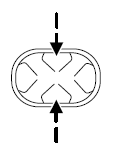
The lumbar control is located on the side of the seat cushion.
Press the front of the control to adjust firmness.
Press the rear of the control to adjust softness.
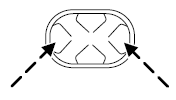
Press the top of the control to raise the height of the lumbar support.
Press the bottom of the control to lower the height of the lumbar support.
See also:
Efficient six-speed transmissions
The 2013 Lincoln MKS is equipped with two versions of the six-speed
SelectShift Automatic™ transmission, both with steering-wheel-mounted paddle
shifters. The 3.7-liter Ti-VCT V6 uses the 6F-50. The ...
Why maintain your vehicle?
This guide describes the scheduled maintenance required for your
vehicle. Carefully following this schedule helps protect against major
repair expenses resulting from neglect or inadequate mainten ...
Fuses
If electrical components in the
vehicle are not working, a fuse may
have blown. Blown fuses are
identified by a broken wire within
the fuse. Check the appropriate
fuses before replacing an ...