
Second-row non-adjustable head restraints

Your vehicle is equipped with second row outboard head restraints that are non-adjustable.
WARNING: To minimize the risk of neck injury in the event of a crash, the driver and passenger occupants should not sit in and/or operate the vehicle, until the head restraint is placed in its proper position. The driver should never adjust the head restraint while the vehicle is in motion.
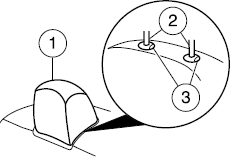
The non-adjustable head restraints consist of:
• a trimmed energy absorbing foam
and structure (1),
• two steel stems (2),
• and two guide sleeve
unlock/remove buttons (3).
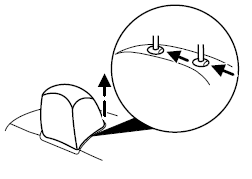
To remove the non-adjustable head restraint, do the following:
1. Simultaneously press and hold both unlock/remove buttons, then pull up on the head restraint.
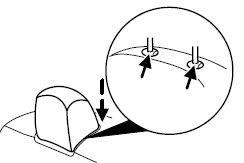
To reinstall the non-adjustable head restraint, do the following:
1. Insert the two stems into the
guide sleeve collars.
2. Push the head restraint down
until it locks.
WARNING: The non-adjustable head restraint is a safety device.
It should be installed whenever the seat is occupied.
WARNING: To minimize the risk of neck injury in the event of a crash, head restraints must be installed properly.
See also:
Unlocking and locking the doors using keyless entry
To unlock the driver’s door, enter the factory set 5-digit code or your
personal code. Each number must be pressed within five seconds of each
other. The interior lamps will illuminate. Note: If t ...
Heated outside mirrors
Both mirrors are heated
automatically to remove ice, mist
and fog when the rear window
defrost is activated.
Note: With the Auto dimming
feature, the mirror glass is thicker
and will ta ...
SENSE AND STYLE
Family Friendly (Not Really, Fair, Great, Excellent): Great
Fun-Factor (None, Some, Good Times, Groove-On): Good Times ...