
Center console

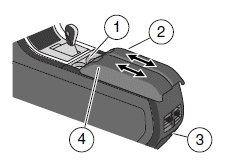
Your vehicle may be equipped with a variety of console features. These include:
1. Cupholders
2. Utility compartment with in-bin
power point, removable coin holder
tray (two grooves on tray slide onto
tracks in main bin) and intelligent
access key slot.
3. Rear power point
4. An individual latch will either
open the entire armrest to access
the utility compartment or allow
each armrest to slide separately.
WARNING: Use only soft cups in the cupholder. Hard objects can injure you in a collision.
See also:
SAFETY
One of the nice things about such an uncluttered backseat in the MKZ Hybrid
is that it's just that. Uncluttered. There weren't any problems with my kids
using the seat belts on their own.
The tw ...
Resuming the set speed
Press and release RES/CNCL. This will automatically return the vehicle
to the previously set speed. The set speed will display continuously in
the message center while ACC is active.
Note: Resu ...
Cabin air filter
Your vehicle is equipped with a cabin air filter, located behind the glove
box. The particulate air filtration system is designed to reduce the
concentration of airborne particles such as dust, sp ...