
Cargo net

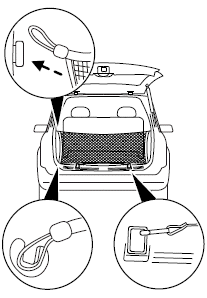
The cargo net secures lightweight objects in the cargo area. Attach the net to the loops and anchors provided.
WARNING: This net is not designed to restrain objects during a collision.
See also:
Blocked sensor
An extreme build-up of materials on
the quarter panel fascias such as
mud or snow can cause degraded
performance of the BLIS . Also,
heavy rain can cause the same
effect. The BLIS can detect ...
Troubleshooting
...
Changing the tires
If you get a flat tire while driving, do not apply the brake heavily.
Instead, gradually decrease your speed. Hold the steering wheel firmly
and slowly move to a safe place on the side of the roa ...