
Replacing rear turn signal bulbs

1. Make sure the headlamp switch is in the off position and open the trunk.
2. Lift out trunk floor carpeting panel to access a luggage scuff plate (hard molding) and a trunk side panel (dark grey, soft wheelhouse side trim panel) at the lamp area.
3. Carefully pull/push the trunk side panel (dark grey, soft wheelhouse side trim panel) outboard to expose the lamp assembly. The most effective point to grasp the trunk side panel when pulling it out from the luggage scuff plate is at it’s bottom edge where that edge meets the exposed sheet metal of the trunk floor.
Note: Do not allow the trunk side panel to remain bent and untucked from the luggage scuff plate (hard molding) for a long period of time.
Doing so may result in permanent deformation.
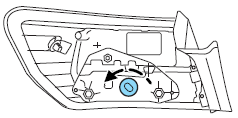
4. Remove the bulb socket by rotating it counterclockwise, then pulling it out of the lamp assembly.
5. Pull the bulb from the socket and push in the new bulb.
6. Install the bulb socket into the lamp assembly by rotating it clockwise.
7. Carefully push the trunk side panel (dark grey, soft wheelhouse side trim panel) back in position to the luggage scuff plate (hard molding).
8. Reinstall the trunk floor carpeting panel.
See also:
When You Believe Your System Is Not Operating Properly
The main function of the tire pressure monitoring system is to warn you
when your tires need air. It can also warn you in the event the system is no
longer capable of functioning as intended. Plea ...
Front passenger sensing system
The front passenger sensing system is designed to meet the regulatory
requirements of Federal Motor Vehicle Safety Standard (FMVSS) 208
and is designed to disable (will not inflate) the front pass ...
Programming MyKey optional settings
Turn the ignition on using an admin key. To program the optional
settings, use the message center buttons to do the following:
1. Get into main menu, select SETTINGS then MYKEY by pressing the
...