
Rolling code programming

Note: If you do not follow the time-sensitive instructions, the device will time out and you will have to repeat the complete procedure.
Note: It may be helpful to have another person assist you in programming the transmitter.
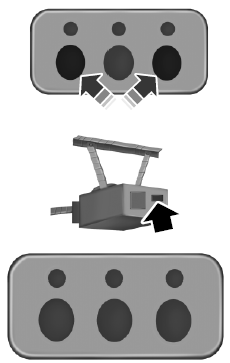
1. Switch the ignition on.
2. Press and hold the outer two buttons for 1–2 seconds, then release.
Note: You may need a ladder to reach the unit and you may need to remove the cover or lamp lens.
Note: If you cannot locate the learn button, refer to the Owner Manual of your garage door opener or call the toll-free help line on 1-866-572-2728.
3. Press the learn button on the garage door opener motor.
Note: You will have 10–30 seconds to complete the following steps.
4. Return to your car.
5. Press and hold the function button you would like to use to control the garage door. You may need to hold the button from 5–20 seconds, during which time the selected button LED lamp will flash slowly.
6. When the garage door moves, release the button within one second.
The LED lamp will flash rapidly until programming is complete.
7. Press and release the button again. The garage door should move, confirming that programming is successful. If your garage door does not operate, repeat the previous steps.
The LED lamp above the selected button will illuminate to confirm that the system is responding to the button command.
To program another rolling code device, repeat steps one through six substituting a different function button in step four.
See also:
Energy management feature — front outboard
• This vehicle has a safety belt system with an energy management
feature at the front seats to help further reduce the risk of injury in
the event of a head-on collision.
• The energy managemen ...
Autounlock feature (if enabled)
The autounlock feature will unlock all the doors when:
• the ignition is on, all the doors are closed, and the vehicle has been in
motion at a speed greater than 12 mph (20 km/h);
• the vehicle ...
Snow tires and chains
The original equipment tires on your vehicle have an all-weather tread
design to provide traction, handling, and braking performance in
year-round driving. You may install snow tires for improved ...