
Using the power lumbar support

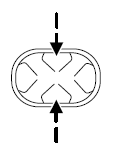
The lumbar control is located on the side of the seat cushion.
Press the front of the control to adjust firmness.
Press the rear of the control to adjust softness.
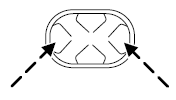
Press the top of the control to raise the height of the lumbar support.
Press the bottom of the control to lower the height of the lumbar support.
See also:
Leather seats (if equipped)
• Remove dust and loose dirt with a vacuum cleaner.
• Clean spills and stains as quickly as possible.
• For routine cleaning, wipe the surface with a soft, damp cloth. For
more thorough cleaning, ...
Changing tires with a TPMS
Each road tire is equipped with
a tire pressure sensor located
inside the tire/wheel cavity. The
pressure sensor is attached to
the valve stem. The pressure
sensor is covered by the tire and ...
Advancetrac with roll stability control™ (RSC ) stability enhancement system
The AdvanceTrac with RSC system provides the following stability
enhancement features for certain driving situations:
• Traction control system (TCS), which functions to help avoid
drive-wheel ...