
SelectShift Automatic™ Transmission

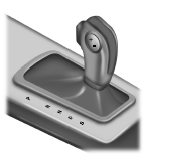
This feature allows the driver to manually change gears up or down as desired. By moving the gearshift lever from D (Drive) to S (Sport), you now have control of selecting the gear using the toggle switch on the gearshift lever.
• Press – on the gearshift lever to
manually downshift the
transmission with the gearshift
lever in S (Sport).
• Press + on the gearshift lever to
manually upshift the transmission
with the gearshift lever in S
(Sport).
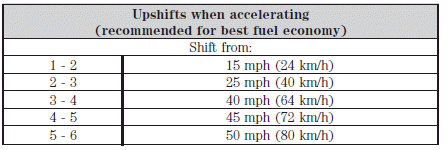
Upshift to the recommended shift speeds according to the following chart:
The message center display in the instrument cluster will show the current selected gear you are in.
In order to prevent the engine from running at too low an RPM, which may cause it to stall, the SelectShift transmission will automatically make some downshifts even if it has determined that you have not downshifted in time. It will still allow you to downshift at any time as long as the SelectShift transmission determines that the engine will not be damaged from over-revving.
Note: Engine damage may occur if excessive engine revving is held without shifting.
See also:
Global close windows
You can close the vehicle’s windows and moon roof (if equipped) by
using the control on the remote
transmitter.
Press and hold the control on the transmitter to begin to close the
windows and ...
Emission control system
WARNING: Do not park, idle, or drive your vehicle in dry grass
or other dry ground cover. The emission system heats up the
engine compartment and exhaust system, which can start a fire.
WARNING: ...