
AM/FM in-dash CD6/MP3 satellite compatible Lincoln premium sound/THX audio system

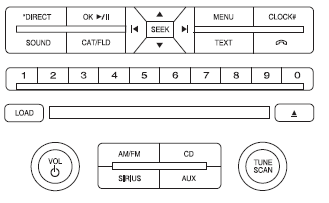
AM/FM in-dash CD6/MP3 satellite compatible Lincoln premium sound/THX audio
system
WARNING: Driving while distracted can result in loss of vehicle control, accident and injury. Ford strongly recommends that drivers use extreme caution when using any device or feature that may take their focus off the road. Your primary responsibility is the safe operation of the vehicle. We recommend against the use of any handheld device while driving, encourage the use of voice-operated systems when possible and that you become aware of applicable state and local laws that may affect the use of electronic devices while driving.
Accessory delay: Your vehicle is equipped with accessory delay. With this feature, the radio and certain electrical features may be used for up to 10 minutes after the ignition is turned off or until either front door is opened.
THX: Your vehicle may be equipped with the THX II certified premium audio system. This system creates optimal acoustic quality for all seating positions and road conditions. The system offers an advanced speaker system, amplifiers, subwoofer and equalization.
See also:
All-wheel drive
All-wheel drive is standard with the twin-turbo 3.5-liter V6. In good weather
over smooth roads at modest speeds - when AWD is not needed - the system
intelligently routes power only to the front wh ...
Front safety belt energy management retractors
The front outboard safety belt energy management retractors allow
webbing to be pulled out of the retractor in a gradual and controlled
manner in response to the occupant’s forward momentum. This ...
Trailer towing
WARNING: Never tow a trailer with this vehicle. Your vehicle is
not equipped to tow. No towing packages are available through
an authorized dealer. ...