
Conditions of operation

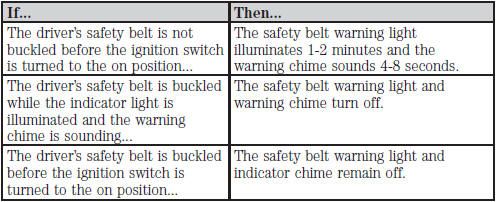
See also:
One-touch up or down (front windows only)
This feature allows the driver or passenger’s window to open or close
fully without holding the control down.
To operate one-touch down, press the switch completely down to the
second detent and ...
Adaptive headlamps (if equipped)
The headlamp beams move in the same direction as the steering wheel
which provides more visibility when driving around curves.
• Without adaptive headlamps (1)
• With adaptive headlamps (2)
N ...
Fuel filter
Your vehicle is equipped with a lifetime fuel filter that is integrated with
the fuel tank. Regular maintenance or replacement is not needed. ...