
Automatic steering into parking space

Automatic steering is activated when you stop the vehicle, remove your hands from the steering wheel and select the R (Reverse) gear. Be sure the steering wheel motion is not obstructed by any objects. The vehicle will steer itself from this point on as you follow the instructions in the message center to safely move the vehicle reverse and forward in the space. You may cancel APA at any time by grabbing the steering wheel or by pressing the APA control switch. When the vehicle is in R (Reverse), the message center displays BACK UP USE CAUTION.
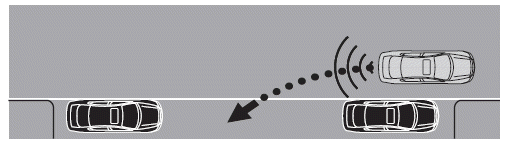
When you determine the vehicle is back far enough or you hear a solid tone from the reverse sensing system, bring the vehicle to a complete stop and move the gearshift to D (Drive). The message center will now display PULL FORWARD USE CAUTION followed by a chime.
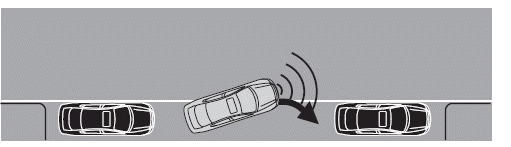
When you determine the vehicle is far enough forward or a solid tone from the forward sensing system (if equipped) is heard, bring the vehicle to a complete stop and move the gearshift to R (Reverse). The message center may display BACK UP SLOWLY USE CAUTION followed by a chime. The system may offer subsequent backward and forward maneuvers before proceeding to the finish phase.
See also:
Peace of mind
•Remote start
•Wheel locks
•Vehicle security systems
•Locking fuel plug for capless fuel system
*Ford Licensed Accessories (FLA) are warranted by the accessory
manufacturer’s warranty. Ford Lice ...
Automatic dimming interior rear view mirror
The interior rear view mirror and a driver’s side exterior mirror have an
auto-dimming function. The electronic day/night mirror will change from
the normal (high reflective) state to the non-glar ...
Collision warning
Collision Warning helps prevent common traffic accidents as forward-looking,
long-distance radar identifies potential obstacles.
When the danger of a collision is detected, the system warns the dri ...