
Blocked sensor
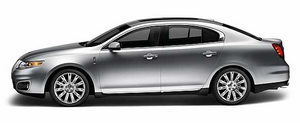
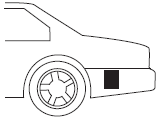
An extreme build-up of materials on the left and/or right quarter panel fascias such as mud or snow can cause degraded performance of the BLIS . Also, heavy rain can cause the same effect. The BLIS can detect this degraded performance and issue a blocked warning to the driver via the message center. If condition is determined by the system, the message center displays BLIND SPOT NOT AVAILABLE or CROSS TRAFFIC NOT AVAILABLE warning and the appropriate left and/or right exterior mirror alert indicator will illuminate. The message center warning may be cleared by the driver but the exterior mirror alert indicator will remain illuminated.
WARNING: Just prior to the system recognizing a blocked condition and alerting the driver, the number of missed objects will increase. To help avoid injuries, NEVER use the BLIS as a replacement for using the side and rear view mirrors and looking over your shoulder before changing lanes. BLIS is not a replacement for careful driving and only an assist.
Once blockage is removed, the system will require some driving time and detection of at least two vehicle object prior to realizing it is unblocked, or the driver can cycle the ignition key. If blocked and the ignition key is cycled, the system resets to unblocked. If however blockage is still present after the key cycle, the system will sense again that it is blocked after driving in traffic.
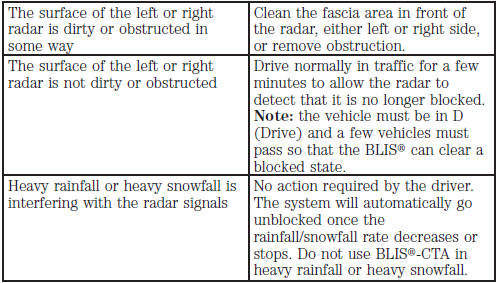
The following table lists possible causes and actions for this message being displayed:
Due to the nature of radar technology, it is possible to get a blockage warning and not be blocked. This is rare and known as a false blockage warning. A false blocked condition will either self clear or clear after a key cycle.
See also:
Ambient lighting
Illuminates footwells, storage bins
and cupholders with a choice of
several colors. The ambient lighting
control is located on the instrument
panel, left of the steering wheel.
• To activat ...
Advancetrac with roll stability control™ (RSC ) stability enhancement system
The AdvanceTrac with RSC system provides the following stability
enhancement features for certain driving situations:
• Traction control system (TCS), which functions to help avoid
drive-wheel ...
Recommended shift speeds
Upshift according to the following chart:
The instrument cluster will show the
current selected gear you are in.
In order to prevent the engine from
running at too low an RPM, which
may ca ...