
Opening the hood

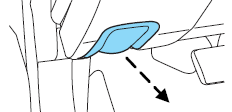
1. Inside the vehicle, pull the hood release handle located under the bottom of the instrument panel near the steering column.
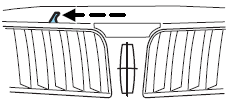
2. Go to the front of the vehicle and release the auxiliary latch that is located under the front center of the hood.
3. Lift the hood and support it with the prop rod.
See also:
Utilizing the mediation/arbitration program (Canada only)
For vehicles delivered to authorized Canadian dealers. In those cases
where you continue to feel that the efforts by Ford of Canada and the
authorized dealer to resolve a factory-related vehicle s ...
HomeLink Wireless Control System
The HomeLink Wireless Control
System, located on the driver’s visor,
provides a convenient way to
replace up to three hand-held
transmitters with a single built-in
device. This feature wil ...
Continuously controlled damping
Throughout 13 decades of the automobile's development, suspension engineers
have worked tirelessly to find an ideal balance between smooth ride and
satisfying, confident handling. Traditionally, smo ...