
Replacing the battery

The intelligent access key (IA key) uses one coin type three-volt lithium battery CR2032 or equivalent.
To replace the battery:
1. Remove the backup key from the transmitter, then twist a thin coin in the slot hidden behind the backup key slot to remove the battery cover.
Note: Do not wipe off any grease on the battery terminals or on the back surface of the circuit board.
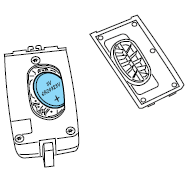
2. Remove the old battery.
Note: Please refer to local regulations when disposing of transmitter batteries.
3. Insert the new battery. Refer to the instructions inside the IA key for the correct orientation of the battery. Press the battery down to ensure that the battery is fully seated in the battery housing cavity.
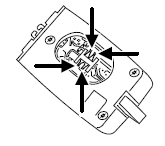
4. Snap the battery cover back onto the transmitter and install the backup key.
Note: Replacement of the battery will not cause the IA key to become de-programmed from your vehicle. They should operate normally after battery replacement.
See also:
BLIS and/or CTA on/off and disable operation
The BLIS and/or the CTA can be turned off via the message center. If
either the BLIS and/or the CTA is turned off, the systems will
automatically turn back on at the next ignition key cycle. When ...
3.7L V6 engine
1. Power steering fluid reservoir
2. Engine coolant reservoir
3. Brake fluid reservoir
4. Battery
5. Power distribution box
6. Air filter assembly
7. Automatic transmission fluid dipstic ...
Vertical aim adjustment
1. Park the vehicle directly in front of a wall or screen on a level surface,
approximately 25 feet (7.6 meters) away.
• (1) 8 feet (2.4 meters)
• (2) Center height of lamp to ground
• (3) 25 ...