
Automatic locking mode

In this mode, the shoulder belt is automatically pre-locked. The belt will still retract to remove any slack in the shoulder belt. The automatic locking mode is not available on the driver safety belt.
When to use the automatic locking mode
This mode should be used any time a child safety seat, except a booster, is installed in passenger front or rear seating positions. Children 12 years old and under should be properly restrained in a rear seating position whenever possible. Refer to Safety restraints for children or Safety seats for children later in this chapter.
How to use the automatic locking mode
1. Buckle the combination lap and
shoulder belt.
2. Grasp the shoulder portion and
pull downward until the entire belt
is pulled out.
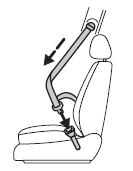
• Allow the belt to retract. As the belt retracts, you will hear a clicking sound. This indicates the safety belt is now in the automatic locking mode.
See also:
Air filter
Refer to scheduled maintenance information for the appropriate
intervals for changing the air filter element.
When changing the air filter element, use only the air filter element
listed. Refer t ...
2012 Lincoln MKT Review
The MKT is an impressive combination of performance, utility, technology and
even affordability among its competition — and I want one in my driveway.
When I reviewed the MKT when it debuted for 2 ...
Adjusting the front power seat
WARNING: Never adjust the driver’s seat or seatback when the
vehicle is moving.
WARNING: Do not pile cargo higher than the seatbacks to
reduce the risk of injury in a collision or sudden stop.
W ...