
Rearview camera system (if equipped)
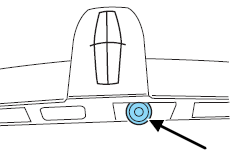
The rearview camera system, located on the trunk just above the license plate, provides a video image which appears on the navigation screen of the area behind the vehicle. It adds assistance to the driver while reversing or reverse parking the vehicle.
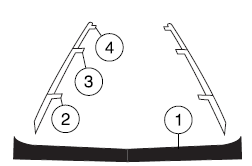
To use the camera system, place the transmission in R (Reverse); an image will display on the navigation system screen. The area displayed on the screen may vary according to the vehicle orientation and/or road condition.
• (1) Rear bumper
• (2) Red zone
• (3) Yellow zone
• (4) Green zone
Always use caution while backing.
Objects in the red zone are closest to your vehicle and objects in the green zone are further away. Objects are getting closer to your vehicle as they move from the green zone to the yellow or red zones.
Use the side mirrors and rearview mirror to get better coverage on both sides and rear of the vehicle.
After shifting out of R (Reverse) and into any gear other than P (Park), the image will remain until the vehicle speed reaches 5 mph (8 km/h), only if the rear camera delay feature is on, or until any navigation radio button is pressed.
Note: The default setting for the rear camera delay is off. Press the “Settings” button found on the navigation screen to set the rear camera delay feature to on or off.
The camera lens for the camera is located on the trunk, above the license plate. Keep the lens clean so that the video image remains clear and undistorted. Clean the lens with a soft, lint-free cloth and non-abrasive cleaner.
Note: If the camera system image is not clear or seems distorted, it may be covered with water droplets, snow, mud or any other substance. If this occurs, clean the camera lens before using the camera system.
WARNING: The camera system is a reverse aid supplement device that still requires the driver to use it in conjunction with the rearview mirror and the side mirrors for maximum coverage.
WARNING: Objects that are close to either corner of the bumper or under the bumper, might not be seen on the screen due to the limited coverage of the camera system.
WARNING: Backup as slow as possible since higher speeds might limit your reaction time to stop the vehicle.
WARNING: Do not use the camera system with the trunk open.
If the back end of the vehicle is hit or damaged, then check with your authorized dealer to have your rear video system checked for proper coverage and operation.
Night time and dark area use
At night time or in dark areas, the camera system relies on the reverse lamp lighting to produce an image. Therefore it is necessary that both reverse lamps are operating in order to get a clear image in the dark. If either of the lamps are not operating, stop using the camera system, at least in the dark, until the lamp(s) are replaced and functioning.
Servicing
• If the image comes on while the vehicle is not in R (Reverse), have
the system inspected by your authorized dealer.
• If the image is not clear, then check if there is anything covering the
lens such as dirt, mud, ice, snow, etc. If the image is still not clear
after cleaning, have your system inspected by your authorized dealer.
See also:
Center console
Your vehicle may be equipped with a variety of console features. These
include:
1. Cup holders with ambient lighting
(if equipped). Slide the door open
to access the cup holders.
2. Utilit ...
Replacing fog lamp bulbs
1. Make sure the fog lamp switch is
in the off position.
2. From underneath the vehicle,
partially remove the tire splash
shield by removing four drive
screws.
After removing to allow fr ...
Refilling with a Portable Fuel Container
WARNING: Do not insert the nozzle of portable fuel containers
or aftermarket funnels into the Easy Fuel system. This could
damage the fuel system and its seal, and may cause fuel to run onto
the ...