
APA finished

When active park assist has completed the automated steering, the message center displays ACTIVE PARK FINISHED followed by a chime.
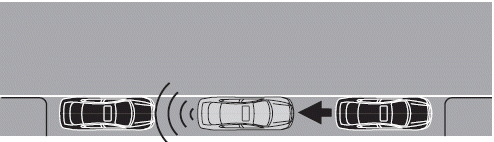
The driver is responsible to assess and correct as necessary the final parking position and put the vehicle in P (Park).
The system can also be deactivated at any time by the following:
• Pressing the APA control switch
• Grabbing the steering wheel
• Exceeding a vehicle speed of 18 mph (30 km/h) for 30 seconds during
active park searching
• Exceeding a vehicle speed of 6 mph (10 km/h) during automatic
steering
• Deactivating the AdvanceTrac system or the system has activated on
a slippery or loose surface
• ABS activation or failure
• Any door (except the driver’s door) opens
• Something touching the steering wheel
If a fault is present in the system, the message ACTIVE PARK FAULT will be displayed followed by a chime. Contact an authorized dealer to have your vehicle serviced.
The system should not be used if:
• a foreign object (i.e. bike rack, trailer, etc.) is attached to the front
or
rear of the vehicle or at another location close to the sensors.
• the front bumper or side sensors are damaged (i.e. in a collision) or
obstructed by a foreign object (i.e. front bumper cover).
• a mini-spare tire is used.
See also:
Identifying components in the engine compartment
3.5L V6 engine
1. Power steering fluid reservoir
2. Transmission fluid dipstick
3. Brake fluid reservoir
4. Battery
5. Power distribution box
6. Air filter assembly
7. Engine oil dipstick
8. ...
Autolock feature
The autolock feature will lock all the doors when:
• all the doors are closed,
• the ignition is in the on position,
• you shift into any gear putting the vehicle in motion, and
• the vehicle atta ...
Easy entry/exit feature
When the ignition is turned off, the column will move to the full up and
in position if this feature is activated through the message center. Refer
to Message center in the Instrument Cluster chap ...