
Autolamp control

The autolamp system provides light sensitive automatic on-off control of the exterior lights normally controlled by the headlamp control.
• To turn autolamps on, rotate the
control to  .
.
• To turn autolamps off, rotate the
control from the autolamp
position.
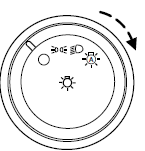
The autolamp system also keeps the lights on for a predetermined amount of time after the ignition switch is turned to off. You can change the amount of time the lamps stay on by using the programming procedure that follows:
Note: If the vehicle is equipped with autolamps, it will have the headlamps on with windshield wipers feature. If the windshield wipers are turned on, the exterior lamps will turn on with the headlamp control in the autolamp position.
Autolamp delay system (if equipped)
If your vehicle is equipped with autolamps, you can set the delay time to keep the headlights on for up to three minutes after the key is turned off. The delay time is set to 20 seconds at the factory, but the delay time may be changed by following the steps below (Steps 1 through 6 must be done within 10 seconds):
1. Turn the vehicle off.
2. Rotate the headlamp control to the autolamp position.
3. Rotate the headlamp control to the off position.
4. Turn the vehicle on.
5. Turn the vehicle off.
6. Turn the headlamp control to the autolamp position (the headlights
should turn on).
7. Turn the headlamp control to the off position when the desired delay
time (up to three minutes) has been reached.
See also:
Infant and/or toddler seats
Use a safety seat that is recommended for the size and weight of the
child.
When installing a child safety seat:
• Review and follow the information
presented in the Airbag
supplemental re ...
Tire change procedure
WARNING: When one of the front wheels is off the ground, the
transmission alone will not prevent the vehicle from moving or
slipping off the jack, even if the vehicle is in P (Park).
WARNING: To ...
Replacing rear brake/tail/turn and sidemarker lamp bulbs
The brake/tail/turn/side marker lamp and backup bulbs are located in the
tail lamp assembly. Follow the same steps to replace the bulbs.
Note: Your vehicle is equipped with a tail lamp assembly c ...