
Panel dimmer control

Use to adjust the brightness of the instrument panel and all applicable lit components in the vehicle during headlamp and parking lamp operation.
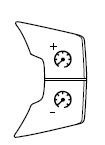
• Tap the top or bottom of the
control to brighten/dim all interior
lit components incrementally, or
• Press and hold the top or bottom
of the control until the desired lighting level is reached.
Note: In the uplevel message center only, a message will pop up that will show incrementally where the dimmer is in relation to the dimming steps. These steps will also vary for daytime and night time dimming.
Note: If the battery is disconnected, discharged, or a new battery is installed, the dimmer control requires re-calibration. Press the dimmer control from the full dim position to the full on position to reset. This will ensure that your displays are visible under all lighting conditions.
Dome lamp control
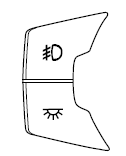
Use to manually turn the dome lamp on.
• Press the bottom of the control.
This will turn on the interior courtesy lights. The lights will remain on until the control is pressed again.
See also:
Transporting children
Always make sure your child is secured properly in a device that is
appropriate for their age, height and weight. All children are shaped
differently. The child height, age and weight thresholds p ...
Troubleshooting
Why isn’t APA searching for a parking space?
• You may have deactivated the AdvanceTrac system.
• One of the doors (except the driver’s door) may not be securely
closed.
Why doesn’t APA offer a ...
Ford esp extended service plans (U.S. only)
More than 32 million Ford and Lincoln owners have discovered the
powerful protection of Ford ESP. It is the only extended service plan
backed by Ford Motor Company, and provides “peace of mind”
...