
Erasing HomeLink buttons

To erase the three programmed buttons (individual buttons cannot be erased):
• Press and hold the two outer HomeLink buttons until the indicator light begins to flash-after 20 seconds. Release both buttons. Do not hold for longer that 30 seconds.
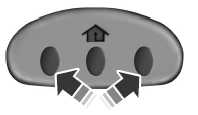
HomeLink is now in the train (or learning) mode and can be programmed at any time beginning with Step 1 in the Programming section.
See also:
Rear window defroster
The rear defroster control is located on the climate control panel and
works to clear the rear window of fog and thin ice.
The engine must be running to operate the rear window defroster.
Press
...
Changing the tires
If you get a flat tire while driving, do not apply the brake heavily.
Instead, gradually decrease your speed. Hold the steering wheel firmly
and slowly move to a safe place on the side of the roa ...
Getting assistance outside the U.S. And Canada
Before exporting your vehicle to a foreign country, contact the
appropriate foreign embassy or consulate. These officials can inform you
of local vehicle registration regulations and where to find ...