
Using speed control

The speed controls are located on the steering wheel. The following buttons work with speed control:
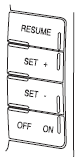
RESUME: Press to resume a set speed.
SET +: Press to increase the set speed.
SET –: Press to decrease the set speed.
OFF/ON: Press to turn speed control off or on.
See also:
Blind spot mirrors (if equipped)
Blind spot mirrors have an integrated convex spotter mirror built into
the upper outboard corner of the outside mirrors. They are designed to
assist the driver by increasing visibility along the s ...
Emission control system
Your vehicle is equipped with various emission control components and a
catalytic converter which will enable your vehicle to comply with
applicable exhaust emission standards. To make sure that t ...
CTA and reverse sensing system (RSS) interaction
CTA works along with the reverse sensing system (RSS) (if equipped).
Become familiar with the warning tones of both systems. ...