
Erasing the function button codes

Note: You cannot erase individual buttons.
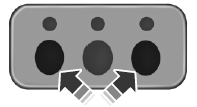
1. Press and hold the outer two function buttons simultaneously for approximately 20 seconds until the LED lamps above the buttons flash rapidly.
2. When the LED lamps flash, release the buttons. The codes for all buttons are erased.
See also:
Trailer sway control
When properly equipped, trailer sway control will use the vehicle’s
AdvanceTrac with RSC system to detect and help reduce trailer sway
by applying brake force at individual wheels and, if necessar ...
Interior mirror
The interior rearview mirror has two pivot points on the support arm
which lets you adjust the mirror up or down and from side to side.
WARNING: Do not adjust the mirror while the vehicle is in
m ...
Memory feature
The integrated keyhead transmitter (IKT) allows you to recall the
memory seat and mirrors feature.
Press to automatically move the
seat and mirrors to the desired
memory position.
Note: The s ...