
Replacing the battery

The integrated keyhead transmitter uses one coin type three-volt lithium battery CR2032 or equivalent.
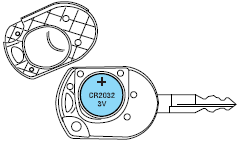
To replace the battery:
1. Twist a thin coin in the slot of the IKT near the key ring in order to remove the battery cover.
Note: Do not wipe off any grease on the battery terminals on the back surface of the circuit board.
2. Remove the old battery.
Note: Please refer to local regulations when disposing of transmitter batteries.
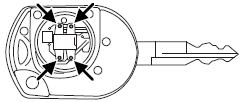
3. Insert the new battery. Refer to the instructions inside the IKT for the correct orientation of the battery. Press the battery down to ensure that the battery is fully seated in the battery housing cavity.
4. Snap the battery cover back onto the key.
Note: Replacement of the battery will not cause the IKT to become deprogrammed from your vehicle. The IKT should operate normally after battery replacement.
See also:
Troubleshooting
...
Tire wear
When the tread is worn down to
1/16th of an inch (2 mm), tires must
be replaced to help prevent your
vehicle from skidding and
hydroplaning. Built-in treadwear
indicators, or “wear bars”, wh ...
Hazard flasher control
The hazard flasher control is located
on the instrument panel above the
climate controls and below the
audio controls. The hazard flashers
will operate when the ignition is in
any position o ...