
Memory seat and mirrors

This system allows automatic positioning of the driver seat and mirrors to two programmable positions.
The memory seat control is located on the driver door.
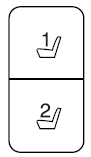
• To program position 1, move the memory features to the desired positions using the associated controls. Press and hold button 1 for at least two seconds. A chime will sound confirming that a memory position has been set.
• To program position 2, repeat the previous procedure using button 2.
A memory seat position may be programmed at any time.
To program the memory feature to a remote entry transmitter, refer to Remote entry system in the Locks and Security chapter.
A programmed memory position can be recalled:
• in any gearshift position if the ignition is not on.
• only in P (Park) or N (Neutral) if the ignition is on.
A memory seat position may be programmed at any time.
The memory positions are also recalled when you press your remote entry
transmitter  button (if the
transmitter is programmed to a memory
position) or, when you enter a valid personal entry code that is programmed
to a memory position. The mirrors will move to the programmed position and
the seat will move to the easy entry position. The seat will move to the final
position when the key is in the ignition (if easy entry feature is enabled).
button (if the
transmitter is programmed to a memory
position) or, when you enter a valid personal entry code that is programmed
to a memory position. The mirrors will move to the programmed position and
the seat will move to the easy entry position. The seat will move to the final
position when the key is in the ignition (if easy entry feature is enabled).
See also:
More standard luxury
The 2011 Lincoln MKZ Hybrid comes standard with features and technologies
that are either not offered on the Lexus HS 250h or are available only at an
extra cost. They include:
SmartGauge with E ...
Washing the exterior
Wash your vehicle regularly with cool or lukewarm water and a neutral
pH shampoo, such as Motorcraft Detail Wash (ZC-3-A), which is
available from your authorized dealer.
• Never use strong hou ...
Perimeter alarm system
The perimeter alarm system will warn you in case of unauthorized entry
to your vehicle.
When the following types of unauthorized entry occur:
• any door, the hood or the liftgate/trunk is open ...