
Changing the air filter element

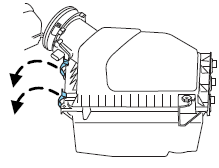
1. Release the clamps that secure the air filter housing cover.
2. Carefully separate the two halves of the air filter housing.
3. Remove the air filter element from the air filter housing.
4. Wipe the air filter housing and cover clean to remove any dirt or debris and to ensure good sealing.
5. Install a new air filter element. Be careful not to crimp the filter element edges between the air filter housing and cover. This could cause filter damage and allow unfiltered air to enter the engine if not properly seated.
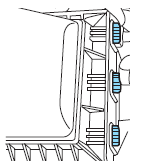
6. Replace the air filter housing cover and secure the clamps. Be sure that the air cleaner cover tabs are engaged into the slots of the air cleaner housing.
Note: Failure to use the correct air filter element may result in severe engine damage. The customer warranty may be void for any damage to the engine if the correct air filter element is not used.
See also:
INTERIOR
The MKZ Hybrid's interior is where it really shines. Not literally; it
literally shines on the outside with all that chrome. On the inside there's a
little shine but mostly some luxury-type touche ...
Fuel filter
Your vehicle is equipped with a lifetime fuel filter that is integrated with
the fuel tank. Regular maintenance or replacement is not needed. ...
Safety belt extension assembly
If the safety belt is too short when fully extended, a safety belt extension
assembly can be obtained from an authorized dealer.
Use only extensions manufactured by the same supplier as the safet ...