
Detection issues

The radar sensor has a limited field of vision. In some situations it may not detect vehicles at all or detect a vehicle later than expected.
Detection issues can occur:
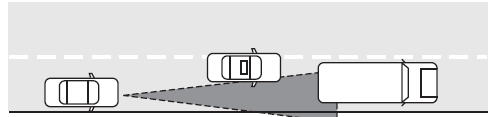
• When driving on a different line than the vehicle in front.
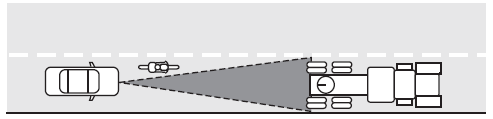
• With vehicles that edge into your lane. These vehicles can only be detected once they have moved fully into your lane.
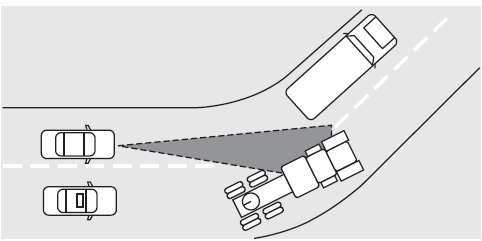
• There may be issues with the detection of vehicles in front when driving into and coming out of a bend or curve in the road.
In these cases ACC may brake late or unexpectedly. The driver should stay alert and intervene when necessary.
If the front end of the vehicle is hit or damaged, the radar sensing zone may be altered causing missed or false vehicle detections. Check with your authorized dealer to have the ACC radar checked for proper coverage and operation.
See also:
How to use the engine block heater
Ensure the receptacle terminals are clean and dry prior to use. To clean
them, use a dry cloth.
Depending on the type of factory installed equipment, your engine block
heater will use .4 to 1.0 k ...
SYNC
Your vehicle is equipped with SYNC , a hands-free communications and
entertainment system with special phone and media features. For more
information, please refer to the SYNC supplement or to the ...
Looks
Even though the MKS is a comfortable car with a refined interior and a lot of
standard features, the first thing people will notice is its bold looks. The
profile is vanilla bland, but both the sn ...