
Replacing the battery

The intelligent access key (IA key) uses one coin type three-volt lithium battery CR2032 or equivalent.
To replace the battery:
1. Remove the backup key from the transmitter, then twist a thin coin in the slot hidden behind the backup key slot to remove the battery cover.
Note: Do not wipe off any grease on the battery terminals or on the back surface of the circuit board.
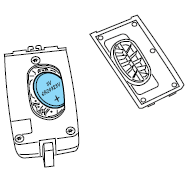
2. Remove the old battery.
Note: Please refer to local regulations when disposing of transmitter batteries.
3. Insert the new battery. Refer to the instructions inside the IA key for the correct orientation of the battery. Press the battery down to ensure that the battery is fully seated in the battery housing cavity.
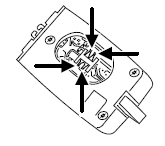
4. Snap the battery cover back onto the transmitter and install the backup key.
Note: Replacement of the battery will not cause the IA key to become de-programmed from your vehicle. They should operate normally after battery replacement.
See also:
Tire Replacement Requirements
WARNING: Only use replacement tires and wheels that are the
same size, load index, speed rating and type (such as P-metric
versus LT-metric or all-season versus all-terrain) as those originally
...
Power liftgate
You can power open or close the liftgate with the following controls:
• Instrument panel control button
• Transmitter button
• Outside liftgate control button
• Control button in the rear car ...
Automatic dimming interior rear view mirror
The interior rear view mirror and a driver’s side exterior mirror have an
auto-dimming function. The electronic day/night mirror will change from
the normal (high reflective) state to the non-glar ...