
Memory seats/power mirrors/steering column

This system allows automatic positioning of the driver seat, power mirrors, and steering column to two programmable positions.
The memory seat control is located on the driver door.
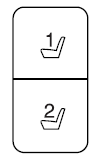
• To program position 1, move the
memory features to the desired
positions using the associated
controls. Press and hold button 1
for at least two seconds. A chime will sound confirming that a memory
position has been set.
• To program position 2, repeat the previous procedure using button 2.
A memory seat position may be programmed at any time.
To program the memory feature to a remote entry transmitter, refer to Remote entry system in the Locks and Security chapter.
A programmed memory position can be recalled:
• in any gearshift position if the ignition is not on.
• only in P (Park) or N (Neutral) if the ignition is on.
The memory positions are also recalled when you press your remote
entry transmitter  (unlock) control
(if the transmitter is programmed
to a memory position) or, when you enter a valid personal entry code
that is programmed to a memory position. The mirrors will move to the
programmed position and the seat will move to the easy entry position.
(unlock) control
(if the transmitter is programmed
to a memory position) or, when you enter a valid personal entry code
that is programmed to a memory position. The mirrors will move to the
programmed position and the seat will move to the easy entry position.
The seat will move to the final position when the key is in the ignition (if easy entry feature is enabled).
See also:
Setting adaptive cruise control
1. Press and release ON. The
message center will display the
gray ACC indicator light, current
gap setting and SET.
2. Accelerate to the desired speed.
3. Press SET upward and release.
...
Checking automatic transmission fluid
Refer to your scheduled maintenance information for scheduled
intervals for fluid checks and changes. Your transmission does not
consume fluid. However, the fluid level should be checked if the
...
Information contained on the tire sidewall
Both U.S. and Canada Federal regulations require tire manufacturers to
place standardized information on the sidewall of all tires. This
information identifies and describes the fundamental charac ...