
Stopping and securing the vehicle

1. Park on a level surface, set the
parking brake and activate hazard
flashers.
2. Place gearshift lever in P (Park)
and turn engine off.
Removing the spare tire and jack
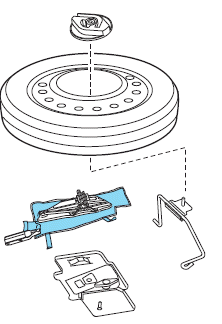
1. Lift the trunk cargo cover, and
remove the wing nut that secures
the spare tire by turning it
counterclockwise.
2. Lift and remove the spare tire
from the trunk.
3. Remove the second wing nut that
secures the jack retention bracket
by turning it counterclockwise,
remove the jack kit from the
vehicle.
4. Remove the jack and the wrench
from the felt bag. Fold down the
wrench socket to use to loosen the
lug nuts and to operate the jack.
See also:
IT'S THE LITTLE THINGS THAT COUNT
Storage Compartments (Puny, Fair, Ample, Galore): Ample
Cargo/Trunk Space (Puny, Fair, Ample, Galore): Ample ...
Battery saver
The battery saver will shut off the lamps 10 minutes after the ignition
has been turned off.
• If the dome lamps were turned on using the panel dimmer control, the
battery saver will shut them ...
Replacing front parking lamp/turn signal/sidemarker bulbs
1. Make sure headlamp switch is in the off position, then open the hood.
2. Reach in behind the headlamp assembly to access the bulb sockets
and connectors.
3. Locate the parking/turn signal
l ...