
Autounlock feature (if enabled)

The autounlock feature will unlock all the doors when:
• the ignition is on, all the doors are closed, and the vehicle has been in
motion at a speed greater than 12 mph (20 km/h);
• the vehicle has then come to a stop and the ignition is turned off or to
accessory; and
• the driver door is opened within 10 minutes of the ignition being
turned off or to accessory.
Note: The doors will not autounlock if the vehicle has been electronically locked after the ignition is turned off and before the driver door is opened.
Deactivating/activating autounlock feature
Your vehicle comes with the autounlock feature activated; there are three methods to enable/disable this feature:
• Through your authorized dealer,
• using a keypad procedure, or
• or by using the instrument cluster message center. Refer to Message
center in the Instrument Cluster chapter.
Note: The autounlock feature can be activated/deactivated independently of the autolock feature.
Keyless entry keypad autounlock enable/disable procedure
1. Turn the ignition off.
2. Close all the doors.
3. Enter factory–set 5–digit entry
code.
4. Press and hold the 3 • 4. While holding the 3 • 4, press and release
the 7 • 8. While still holding the 3 • 4, press and release the 7 • 8 a
second time.
5. Release the 3 • 4.
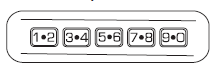
The user should receive a horn chirp to indicate the system has been disabled or a chirp followed by a honk to indicate the system has been enabled.
See also:
Universal garage door
The universal garage door opener can be used to replace the common
hand-held transmitter. ...
Important safety precautions
WARNING: Do not overfill the fuel tank. The pressure in an
overfilled tank may cause leakage and lead to fuel spray and fire.
WARNING: The fuel system may be under pressure. If you hear
a hissing ...
Air filter
Refer to scheduled maintenance information for the appropriate
intervals for changing the air filter element.
When changing the air filter element, use only the air filter element
listed. Refer ...