
Replacing the battery

The intelligent access key (IA key) uses one coin type three-volt lithium battery CR2032 or equivalent.
To replace the battery:
1. Remove the backup key from the transmitter, then twist a thin coin in the slot hidden behind the backup key slot to remove the battery cover.
Note: Do not wipe off any grease on the battery terminals or on the back surface of the circuit board.
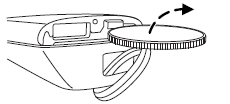
2. Remove the old battery.
Note: Please refer to local regulations when disposing of transmitter batteries.
3. Insert the new battery. Refer to
the instructions inside the IA key
for the correct orientation of the
battery. Press the battery down to
ensure that the battery is fully
seated in the battery housing cavity.
4. Snap the battery cover back onto the transmitter and install the
backup key.
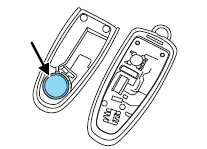
Note: Replacement of the battery will not cause the IKT or IA key to become de-programmed from your vehicle. They should operate normally after battery replacement.
See also:
Fog lamp control
With the ignition on, the fog lamps
can be turned on when the
headlamp control is pulled toward
you and is in any of the following
positions:
• Parking lamps
• Low beams
• Autolamps ...
Congratulations
Congratulations on acquiring your new Lincoln. Please take the time to
get well acquainted with your vehicle by reading this handbook. The
more you know and understand about your vehicle, the grea ...
Erasing HomeLink buttons
To erase the three programmed
buttons (individual buttons cannot
be erased):
• Press and hold the two outer
HomeLink buttons until the
indicator light begins to
flash-after 20 seconds. Re ...