
Center console

Your vehicle may be equipped with a variety of console features. These include:
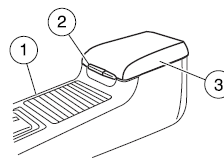
1. Cup holders with ambient lighting (if equipped). Slide the door open to access the cup holders.
2. Utility compartment with aux jack and USB port, a power point, and removable coin holder inside and a secondary storage bin (on hinges inside utility compartment).
Note: Slide the arm rest to the rearward position to open the utility compartment
3. Sliding arm rest.
WARNING: Use only soft cups in the cupholder. Hard objects can injure you in a collision.
See also:
Recommended shift speeds
Upshift according to the following chart:
...
Cargo & Towing
The MKX's car-based construction again shows its benefit in cargo volume;
body-on-frame trucks tend to have less for an equivalent exterior size. My MKX
had a power liftgate, which comes in an opt ...
Ford Esp Extended Service Plans (Canada only)
You can get more protection for your vehicle by purchasing a Ford
Extended Service Plan (ESP). Ford ESP is the only service contract
backed by Ford Motor Company of Canada, Limited. Depending on t ...