
CD/CD player care

Do:
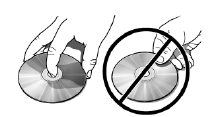
• Handle discs by their edges only.
(Never touch the playing
surface).
• Inspect discs before playing.
• Clean only with an approved CD
cleaner.
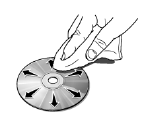
• Wipe discs from the center out.
Don’t:
• Expose discs to direct sunlight or heat sources for extended periods
of time.
• Clean using a circular motion
CD units are designed to play commercially pressed 4.75 in (12 cm) audio compact discs only. Due to technical incompatibility, certain recordable and re-recordable compact discs may not function correctly when used in Ford CD players.
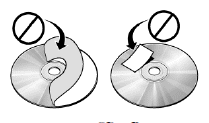
Do not use any irregular shaped CDs or discs with a scratch protection film attached.

CDs with homemade paper (adhesive) labels should not be inserted into the CD player as the label may peel and cause the CD to become jammed. It is recommended that homemade CDs be identified with permanent felt tip marker rather than adhesive labels. Ballpoint pens may damage CDs. Please contact your authorized dealer for further information.
See also:
Extending the engine run time
To keep the engine running for another remote start duration, repeat
Steps 1 and 2 with the engine still running. If you programmed the
duration to last 10 minutes, the second 10 minutes will begi ...
What you should know about automotive fuels
...
Location of the tire label
You will find a Tire Label containing tire inflation pressure by tire size
and other important information located on the B-Pillar or the edge of
the driver’s door. Refer to the payload descriptio ...