
Aiming the headlamps

The headlamps on your vehicle are properly aimed at the assembly plant.
If your vehicle has been in an accident the alignment of your headlamps should be checked by your authorized dealer.
Vertical aim adjustment
1. Park the vehicle directly in front of a wall or screen on a level surface, approximately 25 feet (7.6 meters) away.
• (1) 8 feet (2.4 meters)
• (2) Center height of lamp to
ground
• (3) 25 feet (7.6 meters)
• (4) Horizontal reference line
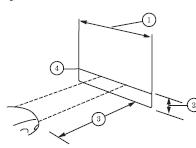
2. Measure the height of the
headlamp bulb center from the
ground and mark an 8 foot
(2.4 meter) horizontal reference line
on the vertical wall or screen at this
height.
3. Turn on the low beam headlamps to illuminate the wall or screen and
open the hood.
To see a clearer light pattern for adjusting, you may want to block the light from one headlamp while adjusting the other.
For vehicles with halogen headlamps:
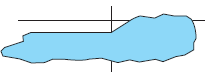
On the wall or screen you will observe a flat zone of high intensity light located at the top of the right hand portion of the beam pattern. If the top edge of the high intensity light zone is not at the horizontal reference line, the headlamp will need to be adjusted.

For vehicles with HID headlamps:
There is a distinct cut-off (change from light to dark) in the left portion of the beam pattern. The top edge of this cut-off should be positioned 2 inches (5 cm) below the horizontal reference line.
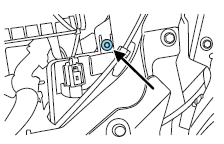
4. Locate the vertical adjuster on each headlamp. Using an Allen wrench or Phillips #2 screwdriver, turn the adjuster either clockwise (to adjust down) or counterclockwise (to adjust up).
The horizontal edge of the brighter light should touch the horizontal reference line.
5. Close the hood and turn off the lamps.
HORIZONTAL AIM IS NOT REQUIRED FOR THIS VEHICLE AND IS NON-ADJUSTABLE.
See also:
Vehicles sold in the U.S. : Using roadside assistance
Complete the roadside assistance identification card and place it in your
wallet for quick reference. This card is found in the Owner’s Guide
portfolio in the glove compartment.
U.S. Lincoln vehi ...
Calculating fuel economy
1. Fill the fuel tank completely and record the initial odometer reading
(in miles or kilometers).
2. Each time you fill the tank, record the amount of fuel added (in
gallons or liters).
3. Afte ...
Starting your vehicle
This system meets all Canadian interference-causing equipment standard
requirements regulating the impulse electrical field strength of radio noise.
Don’t press the accelerator before or during sta ...