
Turn signal control

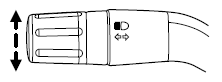
The turn signal lever does not mechanically lock in the upward or downward position when activated. The turn signal control activation and cancellation is electronic.
• To operate the left turn signal,
push the lever down until it stops
and release.
• To operate the right turn signal,
push the lever up until it stops
and release.
• To manually cancel turn signal operation, push the lever again in
either direction.
Lane change
To indicate a left or right lane change:
• Push the lever up/down to the first stop position and release. The turn
signals will flash three times and stop.
• Push the lever up/down to the first stop position and hold. The turn
signals will flash for as long as the lever is held in this position.
See also:
SENSE AND STYLE
Family Friendly (Not Really, Fair, Great, Excellent): Fair
Fun-Factor (None, Some, Good Times, Groove-On): None ...
Power steering fluid
Check the power steering fluid. Refer to scheduled maintenance
information.
1. Start the engine and let it run
until it reaches normal operating
temperature (the engine coolant
temperature ...
Folding down the 60/40 rear seats
Note: The head restraints should be placed in the full down position
before folding the seatback down.
Note: Ensure that no objects such as books, purses, or briefcases are on
the floor in fron ...