
Cross traffic alert (CTA) system operation

The CTA system warns the driver of approaching vehicles when R (Reverse) is selected and the vehicle is backing out of a front-in parking spot. It sounds a series of tones and flashes the BLIS indicator found on the exterior mirror on the side of the approaching vehicle. Additionally, the message center will display either, VEHICLE COMING FROM RIGHT or VEHICLE COMING FROM LEFT to warn the driver from which direction vehicles are approaching.
The system is not designed to prevent contact with other vehicles or objects. The system is designed to provide a warning to assist the driver in detecting vehicles in the blind zones. The system will not detect infrastructure, pedestrians, or bicyclists.
WARNING: To help avoid personal injury, NEVER use the CTA system as a replacement for using the side and rear view mirrors and looking over your shoulder before backing out of a parking space.
CTA is not a replacement for careful driving and only an assist.
The CTA system detects vehicles approaching up to 45 feet (14 meters) away. Coverage decreases when vehicles and objects in close proximity block the CTA sensors (refer to figure for approximate zone coverage areas [sensor obstructed for vehicle on left]). Backing slowly from the parking spot in these situations helps to increase the sensor coverage and effectiveness.
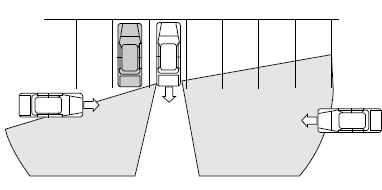
CTA coverage also decreases when parking at shallow angles (refer to figure for approximate zone coverage areas [sensor obstructed for vehicle on left]).
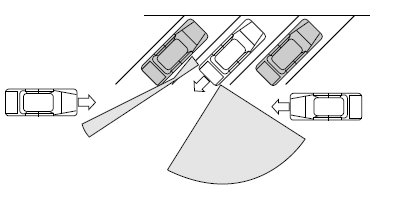
CTA detection limitations: Due to the nature of radar technology, there may be certain instances where vehicles entering and exiting the blind spot zones may not be detected. Below is a list of circumstances that may cause non-detection:
• Debris build-up on the rear quarter panel fascias
• The rear quarter panel radar beams are obstructed or partially
obstructed by an adjacently parked vehicle or object.
• Approaching vehicles passing at speeds greater than 15 mph
(24 km/h)
• Severe weather conditions
• Driving in reverse faster than 3 mph (5 km/h)
• Backing out of an angled parking spot
See also:
Voice commands in climate mode
Please refer to the Voice commands in climate mode section of the
Navigation system supplement for more information on using voice
commands with the climate control system. ...
Dissimilar spare tire/wheel information
WARNING: Failure to follow these guidelines could result in an
increased risk of loss of vehicle control, injury or death.
If you have a dissimilar spare tire/wheel, then it is intended for
tempo ...
Automatic search for parking space
To start, press the APA control
switch (on the center console). The
message center will display ACTIVE
PARK SEARCHING. To designate
what side of the street to search on,
use the turn signal. ...