
AM/FM in-dash CD6/MP3 satellite compatible Lincoln premium sound/THX audio system

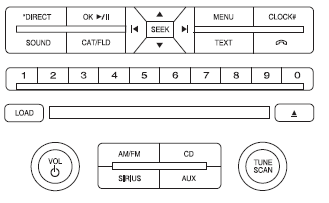
AM/FM in-dash CD6/MP3 satellite compatible Lincoln premium sound/THX audio
system
WARNING: Driving while distracted can result in loss of vehicle control, accident and injury. Ford strongly recommends that drivers use extreme caution when using any device or feature that may take their focus off the road. Your primary responsibility is the safe operation of the vehicle. We recommend against the use of any handheld device while driving, encourage the use of voice-operated systems when possible and that you become aware of applicable state and local laws that may affect the use of electronic devices while driving.
Accessory delay: Your vehicle is equipped with accessory delay. With this feature, the radio and certain electrical features may be used for up to 10 minutes after the ignition is turned off or until either front door is opened.
THX: Your vehicle may be equipped with the THX II certified premium audio system. This system creates optimal acoustic quality for all seating positions and road conditions. The system offers an advanced speaker system, amplifiers, subwoofer and equalization.
See also:
Guarding Against Exhaust Fumes
WARNING: If you smell exhaust fumes inside your vehicle, have
this checked immediately. Do not drive your vehicle if you smell
exhaust fumes. Carbon monoxide is present in exhaust fumes. Take
pr ...
Automatic locking mode
In this mode, the shoulder belt is automatically pre-locked. The belt will
still retract to remove any slack in the shoulder belt. The automatic
locking mode is not available on the driver safety ...
How Temperature Affects Your Tire Pressure
The tire pressure monitoring system (TPMS) monitors tire pressure in
each pneumatic tire. While driving in a normal manner, a typical
passenger tire inflation pressure may increase approximately 2 ...