
Autolamp control

The autolamp system provides light sensitive automatic on-off control of the exterior lights. When selected, the automatic high beam system is active, if equipped and if enabled.
See Auto high beams later in this chapter.
• To turn autolamps on, rotate the
control counterclockwise to  .
.
• To turn autolamps off, rotate the
control clockwise to off.
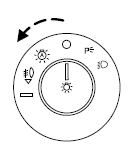
The autolamp system also keeps the lights on for a predetermined amount of time after the ignition is turned off. You can change the amount of time the lamps stay on by using the programming procedure that follows:
Note: With autolamps, your vehicle has a headlamps on with windshield wipers feature. If the windshield wipers are turned on (for a brief period of time), the exterior lamps will turn on with the headlamp control in the autolamp position.
Autolamps - Programmable exit delay
Programmable exit delay allows the length of the autolamp exit delay to be changed.
To program the auto lamp exit time delay:
1. Start with the ignition off and the headlamp control in the autolamp
position.
2. Turn the headlamp switch to off.
3. Turn the ignition on and then off.
4. Turn the headlamp switch to the autolamp position. The headlamps
will turn on.
5. Wait the desired amount of time for the exit delay you want (up to
three minutes), then turn the headlamps off.
See also:
Opening the power liftgate
Press twice within three seconds
to fully unlatch and open the
liftgate.
WARNING: Make sure all persons are clear of the liftgate area
before using power liftgate control.
In order to fully l ...
Lane keeping system
The newly available Lane Keeping System adds to the advanced capabilities
already offered on MKT, including collision warning and BLIS® (Blind Spot
Information System) with cross-traffic alert.
La ...
Collision warning system (if equipped)
The collision warning with brake support, is designed to alert the driver
of certain collision risks with a red warning light located above the
dashboard and an audible warning chime. The brake su ...