
Replacing front parking lamp/turn signal/sidemarker bulbs

1. Make sure headlamp switch is in the off position, then open the hood.
2. Reach in behind the headlamp assembly to access the bulb sockets
and connectors.
3. Locate the parking/turn signal
lamp electrical connector and
remove it by pulling it straight off.
4. Remove the bulb socket by
turning it counterclockwise and
pulling it straight out.
5. To remove the bulb, pull it
straight out of the bulb socket.
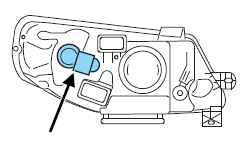
Install the new bulb(s) in reverse order.
See also:
Driving on slippery surfaces with AWD vehicles
AWD vehicles are specially equipped for driving on sand, snow, mud and
rough roads and have operating characteristics that are somewhat
different from conventional vehicles, both on and off the hi ...
Inflatable rear belts
Second-row outboard passengers - often children or mature passengers - can
benefit from available inflatable rear belts, a segment first.
These advanced restraints spread impact forces across more ...
Toothy Grille
The MKZ's styling is starting to grow on me. The front end is distinctive. It
gets a new tooth-like grille for 2010, which bears a closer resemblance to
models like Lincoln's MKS full-size sedan a ...