
Gate Operator & Canadian Programming

During programming, your hand-held transmitter may automatically stop transmitting — not allowing enough time for HomeLink to accept the signal from the hand-held transmitter.
After completing Step 1 outlined in the Programming section, replace Step 2 with the following:
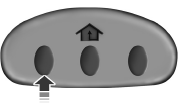
Note: If programming a garage door opener or gate operator, it is advised to unplug the device during the “cycling” process to prevent overheating.
• Continue to press and hold the HomeLink button (note Step 2 in the
Programming section) while you press and release — every two
seconds (“cycle”) your hand-held transmitter until the frequency
signal has been accepted by the HomeLink . The indicator light will
flash slowly and then rapidly after HomeLink accepts the radio
frequency signal.
• Proceed with Step 3 in the Programming section.
See also:
Clear MyKey
To reset all MyKeys as admin keys, do the following:
1. Turn the vehicle on using the admin key.
2. Press SETUP until PRESS RESET TO CLEAR MYKEY is displayed.
3. Press and release the RESET button. ...
Engine block heater (if equipped)
WARNING: Failure to follow engine block heater instructions
could result in property damage or physical injury.
WARNING: To reduce the risk of electrical shock, do not use
your heater with ungrou ...
Attaching child safety seats with tether straps
Many forward-facing child safety seats include a tether strap which
extends from the back of the child safety seat and hooks to an anchoring
point called the top tether anchor. Tether straps are a ...