
Speed control

With speed control set, you can maintain a set speed without keeping your foot on the accelerator pedal.
WARNING: Do not use the speed control in heavy traffic or on roads that are winding, slippery or unpaved.
Using speed control
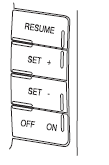
The speed controls are located on the steering wheel. The following buttons work with speed control:
RESUME: Press to resume a set speed.
SET +: Press to increase the set speed.
SET –: Press to decrease the set speed.
OFF/ON: Press to turn speed control off or on.
See also:
Cabin air filter
Your vehicle is equipped with a cabin air filter, located behind the glove
box. The particulate air filtration system is designed to reduce the
concentration of airborne particles such as dust, sp ...
Remote start climate operation (if equipped)
The climate control system will condition the cabin temperature during
remote start. Engine idle may increase to help with adjusting the cabin
temperature.
Note: No climate control adjustments ...