
Gate Operator & Canadian Programming

During programming, your hand-held transmitter may automatically stop transmitting — not allowing enough time for HomeLink to accept the signal from the hand-held transmitter.
After completing Step 1 outlined in the Programming section, replace Step 2 with the following:
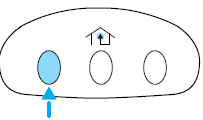
• Continue to press and hold the HomeLink button (note Step 2 in the
Programming section) while you press and release — every two
seconds (“cycle”) your hand-held transmitter until the frequency
signal has been accepted by the HomeLink . The indicator light will
flash slowly and then rapidly after HomeLink accepts the radio
frequency signal.
• Proceed with Step 3 in the Programming section.
See also:
System warnings
System warnings alert you to possible problems or malfunctions in your
vehicle’s operating systems.
In the event of a multiple warning situation, the message center will cycle
the display to show ...
Efficient six-speed transmissions
The 2013 Lincoln MKS is equipped with two versions of the six-speed
SelectShift Automatic™ transmission, both with steering-wheel-mounted paddle
shifters. The 3.7-liter Ti-VCT V6 uses the 6F-50. The ...
Transporting children
Always make sure your child is secured properly in a device that is
appropriate for their age, height and weight. All children are shaped
differently. The child height, age and weight thresholds p ...